
Screenshots

App details
- Version
- 4.7.1.2054 | 4.7.0.2045 | 4.6.0.2025 | 4...
- Size
- 77.74 MB
- Updated
- October 29, 2024
- Requires
- Windows 7
- Language
- English
- License
- Free
- Developer
- ByteScout
- Category
- Windows OS
SoftPas in:
This product is also available in the following languages:
About XLS Viewer
Download XLS Viewer – Free Spreadsheet Viewer & Editor for Windows, Mac, Android, iOS
Looking for a reliable way to open, view, and edit XLS files without Microsoft Office? The XLS Viewer is a lightweight, secure, and free software tool designed for Windows, Mac, Android, and iOS users. Whether you're a student, teacher, or business professional, this powerful spreadsheet viewer allows you to access your XLS files directly on your PC, laptop, tablet, or smartphone. No need to upload sensitive data to online converters or install a full Office suite. With a clean, Excel-like interface and minimal system requirements, XLS Viewer delivers fast performance and seamless compatibility across multiple platforms. It supports legacy formats like XLS and works smoothly on older systems such as Windows 95 through Windows 10, including Windows 11 with compatibility mode. The software is safe, malware-free, and ideal for quick file access, editing, and sharing. Download XLS Viewer today and enjoy hassle-free spreadsheet management on any device.
Key Features of XLS Viewer
One of the standout reasons why XLS Viewer is a top choice among spreadsheet tools is its rich set of features designed for practical, everyday use. First and foremost, it offers full read and write capabilities for XLS files, allowing users to not only view but also edit and save spreadsheets directly from the app. This makes it perfect for quick updates, data corrections, or sharing modified versions without needing Microsoft Excel. The interface closely mimics the familiar layout of Microsoft Excel, reducing the learning curve for users who are already accustomed to spreadsheet software. You’ll find common tools like cell selection, formatting options, formula support, and basic data sorting, all presented in an intuitive way.
Another major advantage is its lightweight design. Unlike heavy office suites, XLS Viewer consumes minimal system resources, ensuring smooth performance even on older machines with limited RAM or processing power. It installs in seconds and runs efficiently without slowing down your device. The software is also completely offline, meaning your files never leave your device—ideal for handling confidential financial records, academic data, or business reports. For added convenience, it supports batch file opening, so you can load multiple XLS files at once. Plus, the built-in print function lets you generate hard copies directly from the app, perfect for classroom assignments or client presentations.
Security is a top priority. The software is free from malware, spyware, and adware, ensuring a safe download and usage experience. Regular updates are released to fix bugs and improve compatibility, especially with newer operating systems. Whether you're using Windows, Mac, Android, or iOS, XLS Viewer delivers consistent performance across platforms. Its cross-device compatibility means you can view and edit files on your desktop and continue working on your tablet without losing progress. With features like zoom controls, grid visibility toggles, and customizable views, this tool offers a professional-grade experience without the premium price tag.
How to Install and Use XLS Viewer
Getting started with XLS Viewer is simple and requires just a few steps. First, visit the official website and download the appropriate version for your operating system—whether you're using Windows 7 through Windows 11, macOS, Android, or iOS. The download is free and typically under 10 MB, making it fast even on slow internet connections. Once downloaded, run the installer file. On Windows, you may need to enable compatibility mode for older systems like Windows 98 or XP, but the built-in troubleshooter makes this process straightforward. On Mac, simply drag the app into your Applications folder. For Android and iOS users, the app is available via the Google Play Store and Apple App Store, respectively.
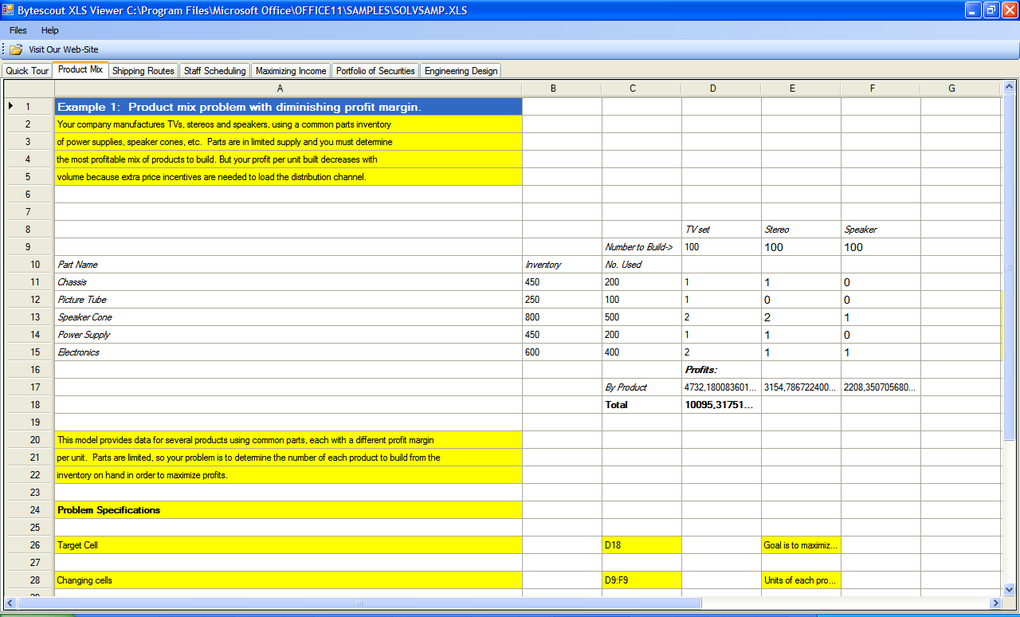
After installation, launch the software. The main window opens with a clean, Excel-inspired layout. To open an XLS file, click on File > Open, browse to your desired file, and select it. The spreadsheet loads instantly, displaying all data, formulas, and formatting. You can now edit cells, insert rows, apply basic formatting (bold, italic, font size), and even use simple formulas like SUM or AVERAGE. When you're done, go to File > Save to store your changes directly to the original file or choose Save As to create a new copy. The app also supports exporting to other formats like CSV or PDF, expanding its usability.
For users who frequently access spreadsheets, XLS Viewer offers a recent files list and drag-and-drop functionality, allowing you to open files by simply dragging them onto the application window. The interface is fully responsive, making it easy to navigate on both desktop and touch-enabled devices. Additionally, keyboard shortcuts are supported for common actions, boosting productivity. If you encounter any issues, the built-in help section provides clear instructions and troubleshooting tips. With its user-friendly design and minimal setup, XLS Viewer is accessible to beginners and efficient for advanced users alike.
Compatibility & System Requirements
XLS Viewer is engineered for broad compatibility, ensuring that users across various platforms and system generations can benefit from its functionality. On Windows, it supports a wide range of operating systems, including Windows 95, 98, ME, NT, 2000, XP, Vista, Windows 7, 8, 10, and 11. For older systems, compatibility mode can be enabled through the system’s troubleshooter, allowing seamless operation. The software requires Microsoft .NET Framework 2.0 or higher, which is commonly pre-installed on modern Windows machines. If not present, the installer will prompt you to download it automatically.
For Mac users, XLS Viewer is compatible with macOS 10.12 and later versions. The app is optimized for Apple Silicon (M1/M2) and Intel-based Macs, ensuring smooth performance and fast loading times. On Android, the app is available on devices running Android 6.0 (Marshmallow) and above, supporting tablets and smartphones. The mobile version includes touch-friendly controls and a responsive layout for on-the-go editing. Similarly, the iOS version is available for iPhone and iPad users running iOS 12 or later, with support for Apple Pencil for precise data entry.
Despite its wide reach, XLS Viewer maintains a small footprint. It uses less than 50 MB of RAM during operation and requires only 200 MB of disk space. This makes it ideal for low-end devices, netbooks, or systems with limited storage. The software does not require internet access to function, making it perfect for offline environments like classrooms, remote offices, or travel. Whether you're working on a legacy system or the latest device, XLS Viewer adapts effortlessly. Regular updates ensure continued support for new OS versions and improved security, so you can always rely on a stable and secure experience.
Pros and Cons
- Pros:
- Free to download and use with no hidden costs
- Lightweight and fast, ideal for older or low-spec devices
- Supports XLS files without requiring Microsoft Office
- Offline operation ensures data privacy and security
- Intuitive interface similar to Microsoft Excel
- Available for Windows, Mac, Android, and iOS
- Allows editing, saving, and exporting of files
- Malware-free and safe to install
- Cons:
- Limited advanced formula support compared to full Excel
- No built-in collaboration features (e.g., real-time sharing)
- Does not support newer XLSX format (only XLS)
- Mobile version lacks some desktop-level features
- Occasional compatibility issues on very old systems
Frequently Asked Questions (FAQ)
Is XLS Viewer safe to download and use?
Yes, XLS Viewer is completely safe to download and use. It is free from malware, spyware, and adware. The software is regularly scanned and verified by multiple security platforms to ensure user safety. Always download from the official website to avoid third-party versions that may contain unwanted software.
Can I edit XLS files with XLS Viewer?
Absolutely. XLS Viewer allows you to open, edit, and save XLS files directly. You can modify cell content, apply formatting, insert rows, and use basic formulas. Changes are saved locally, so your data remains secure and private.
Does XLS Viewer support XLSX files?
Currently, XLS Viewer only supports the older XLS format. If you have an XLSX file, you’ll need to convert it to XLS first using tools like Microsoft Excel, LibreOffice, or online converters.
Is XLS Viewer available for Mac and mobile devices?
Yes, XLS Viewer is available for macOS, Android, and iOS. The Mac version works on macOS 10.12 and above, while the mobile apps are available on the Google Play Store and Apple App Store for devices running Android 6.0+ and iOS 12+ respectively.
How often does XLS Viewer receive updates?
The development team releases updates periodically to fix bugs, improve performance, and enhance compatibility with new operating systems. Users are encouraged to check for updates regularly to ensure optimal functionality.
Conclusion: A Must-Have Tool for Spreadsheet Access
If you frequently work with XLS files but don’t have access to Microsoft Office, XLS Viewer is the perfect solution. This free, secure, and lightweight software delivers a reliable way to open, view, and edit spreadsheets across Windows, Mac, Android, and iOS devices. With its intuitive interface, offline functionality, and strong privacy protections, it’s ideal for students, educators, and professionals who need quick access to data without the overhead of a full office suite.
While it has some limitations—such as no XLSX support and basic formula capabilities—it excels in simplicity, speed, and accessibility. Whether you're reviewing a grade sheet, analyzing sales data, or preparing a budget, XLS Viewer ensures you’re never locked out of your files. Its cross-platform availability and regular updates make it a future-proof choice for modern users.
Download XLS Viewer today and take control of your spreadsheets—no Office required.
Guides & Tutorials
How to install XLS Viewer
- Click the Download button above.
- Once redirected, accept the terms and click Install.
- Wait for the XLS Viewer download to finish on your device.
How to use XLS Viewer
This software is primarily used for its core features described above. Open the app after installation to explore its capabilities.
User Reviews
No reviews yet. Be the first to share your experience.
You may also like
more
Llama 2
Free-to-use large language model As the new addition to Meta’s arsenal of langua...

NotebookLM
Revolutionizing the note-taking and idea-generation process NotebookLM is an exp...

Github co pilot
AI-inspired software development and coding platform GitHub Copilot is a browser...

Google Gemma
Google’s lightweight AI models Introducing Google Gemma , a family of cutting-ed...

AI Image Enlarger
A free app for Windows, by ai-image-larger. AI Image Enlarger is a free software...

DALL E
AI-driven text-to-image transformation engine DALL·E is a free graphic and desig...